 Pet Pet GeneratorPet Pet Generator
The petting GIF maker strokes a hand across your photo, then exports the loop as a GIF.
Upload a photo of your pet, character or PFP, and the petting GIF maker strokes a hand across it at 12 frames per second, tuned for a calm, continuous loop. The sample here is the tool’s real output.
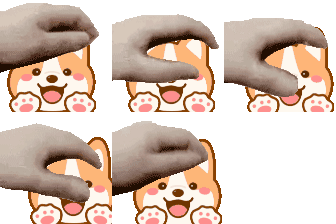
A petting GIF is a short, looping animation in which a hand strokes back and forth across the top of a subject, the same motion as ruffling a cat or smoothing a dog’s fur. Where a headpat is a single pat from above, petting is a repeated, side-to-side caress, which makes it feel warmer and more continuous. It shows up in the same places a headpat does: Discord replies, fan-art threads, and anywhere a quick “good creature” reaction is called for.
The format’s roots are in the same petpet meme. Our history of the petpet meme covers how it spread.
It helps to separate the three hand motions people often lump together:
The hand strokes side to side, like stroking a cat. That is the motion this petting GIF maker produces.
The hand drops onto the head for a single, soft pat. Our headpat GIF maker builds that version.
The image itself is squeezed and wobbled under a rapidly moving hand. That is what our petpet generator does.
Everything below is about the first motion only, so the tuning advice actually matches the animation the petting GIF maker exports.
The petting GIF maker above starts from a petting preset, so most of this is alignment and taste.
The hand travels horizontally, so give the subject a little space on the left and right edges. Square images fit the frame best, and a clear, well-lit subject reads far better at small GIF sizes than a busy backdrop.
Drag and drop it into the tool, or click the upload area. If you were planning to paste an image URL instead: most sites, Discord and Google Photos among them, block other websites from embedding their images, so the load fails with a blank frame. Save the picture to your device first, then upload the file. That always works.
Turn on “Move Pet Position” in the petting GIF maker and drag the image until the hand rests on the spine or the head rather than on empty space. On desktop you can also nudge it with the arrow keys. A stroke that crosses the subject reads as a pet; a stroke that slides over the corner reads as broken.
Open Advanced Options. A petting GIF wants a slightly bigger sweep and a livelier speed than a headpat, which is why the tool starts you at a faster frame rate and a larger hand travel. Then adjust Pet Image Size until the subject fills most of the frame while the hand still crosses it.
Press Download when the preview looks right. The GIF is generated entirely in your browser, which also means it only lives in your browser until you save it, so read the saving section below before you share it.
Pet photos are the most natural input for this petting GIF maker, because the stroke is literally how people calm an animal. The trick is aiming: point the hand at the spine or the crown, not at the nose or the paws. A stroke along the spine reads instantly as being petted, while a stroke across the face looks like the hand is swatting.
Cropping matters more here than it does for a headpat. Square off the shot and keep the animal away from the left and right edges so the hand has somewhere to travel; a pet crammed into one corner means every other frame the hand is petting the void. A little headroom above the animal is fine, since the hand rides along the top, but you do not need the big empty band a downward pat demands.
Fur detail is the trade-off at GIF sizes. A dense, high-contrast coat, like a tabby’s stripes or a husky’s markings, survives the downscale and makes the loop feel alive; a flat, low-contrast subject can blur into a blob at 112 pixels. If the pet disappears into the background, use the Background Color control to add a solid fill, which gives the silhouette an edge the eye can follow.
The motion is gentle and continuous, which is why it works wherever a small, affectionate reaction fits.
A petting GIF of someone’s pet or avatar is the go-to “good creature” reaction when a friend shares a photo of their cat or dog, or just had a rough day and needs a pat. Because the loop is continuous, it reads as comfort rather than a one-off joke.
A looping pet works as a reply when a plain like feels too cold and a headpat feels too formal. It doubles as a wholesome reaction under fan art of animals and chibi characters without a single word.
A petting GIF illustrates a cozy, low-stakes post, such as a pet-care tip or a “meet the team’s dogs” section, and it loads inline anywhere an image does. More placement ideas live in our reaction GIF guide.
Your petting GIF maker runs locally in your browser, so the GIF exists only in that tab until you download it. The preview link works on your device alone; send it to someone and they get a broken image. Download the file first, then share the file.
Upload a photo into the free petting GIF maker above, turn on Move Pet Position, and slide the subject under the hand so the palm rests on the back or head. The tool already starts in a petting-tuned preset that sweeps the hand side to side, so press Download once the preview looks right. Everything runs online in your browser: no sign-up, no watermark.
Yes. The petting GIF maker handles cats and dogs the same way, because the motion is literally a stroke along the spine or the head. Square a shot with a little room above the animal, line the hand up with the body rather than the top of the frame, and keep the speed gentle so the loop reads as a calm pet rather than a flick.
In the petting GIF maker, leave the Background Color control empty, which is the default, and the export is a transparent GIF. If your source image is itself a transparent PNG, the transparency is preserved through the petting animation and into the downloaded file, so it drops cleanly onto any chat or webpage.
Tap Download in your phone’s system browser: on iOS, long-press the opened GIF and choose Save to Photos; on Android, find the file in the Downloads folder. If the download silently fails, you are probably inside an in-app browser like WeChat, QQ or Instagram. Open this page in Chrome or Safari instead.
They are two different hand motions. A petting GIF sweeps the hand back and forth across the top of the subject, like stroking a cat; a headpat GIF drops the hand onto the head once for a single, soft pat. This petting GIF maker makes the stroking version, while our headpat GIF maker makes the single-pat version.
A square-ish image with the subject centered and room on both sides for the hand to travel. The stroke moves horizontally, so a figure that is too tight to the left or right edge will have the hand slide off into empty space. Pets, chibi characters and PFPs read best at GIF sizes.